Clevo PA71, Checked: A Real Gaming Chassis Behind a Merged Spec Sheet
People searching clevo pa71 usually want one machine: a 17.3-inch gaming laptop with a fast screen, a Core i7 and a GTX 1070 or 1080, checked before they buy one second-hand. The machine is real — but that single spec sheet is not. No Clevo PA71 ever shipped in the exact combination the guides print, because the guides merge two generations of the chassis into one laptop.
Clevo is a Taiwanese manufacturer, founded in 1983, that sells laptop chassis — barebones — to system integrators, who finish them and sell them under their own names. Schenker’s XMG Pro 17 and PC Specialist’s Defiance IV are this chassis wearing shop badges. The PA71 family ran through 2017 and 2018 in two main generations, and almost everything confusing about it comes from treating those two as one machine.
This article runs the checks in the open — the integrator record, the independent review measurements and the maker’s own company record — keeps the competitor’s headings in order, separates the variants, and marks each printed claim as confirmed, corrected or unverifiable, so a reader can see what a PA71 actually is before spending money on one.

Clevo PA71 – Profile Biography Table
The competitor’s profile table is kept in this slot, but as a checks table: each of its claims is set against what the record actually shows. The pattern that emerges is the article in miniature — a real chassis, described by a table that borrows from two generations of it and, in one row, from a different manufacturer’s machine altogether.
| Profile item | The guide’s claim | What the record shows |
|---|---|---|
| Brand / Model | Clevo PA71 | Confirmed. Clevo Co. of Taiwan (founded 1983) built the PA71 as a 17.3-inch gaming barebone, sold finished by integrators such as Schenker (XMG Pro 17) and PC Specialist (Defiance IV). |
| Display | 17.3-inch Full HD (1920×1080), IPS, 144Hz | Partly confirmed. 17.3-inch Full HD was the base panel family; the documented fast option in this chassis was a 120 Hz panel, and the flagship review configuration carried a UHD 4K 60 Hz G-Sync IPS panel. No 144 Hz PA71 panel appears in any record located — see the display section. |
| Processor | Intel Core i7-7700HQ / i7-8750H | Both real — in different generations. The i7-7700HQ belongs to the 2017 PA71HS-G; the i7-8750H to the 2018 PA71ES-G. No single PA71 carries both. |
| Graphics | NVIDIA GeForce GTX 1070 / 1080 | Corrected. The documented PA71 graphics options are a GeForce GTX 1060 (6 GB GDDR5) or a GTX 1070. No PA71 record located offers a GTX 1080 — that card belongs to Clevo’s larger desktop-CPU chassis and to another maker’s P71 line. |
| RAM | Up to 32GB DDR4 | Confirmed. Two SO-DIMM slots, 32 GB maximum; the review unit carried 2 × 16 GB DDR4-2400. Copies claiming 64 GB are describing a four-slot chassis, not this one. |
| Storage | 256GB SSD + 1TB HDD (configurable) | A configuration, not a specification. The chassis holds up to three drives — two M.2 slots and one 2.5-inch bay. One documented review build shipped a 500 GB SSD + 1 TB HDD; the base build shipped a 500 GB hard drive alone. |
| Operating System | Windows 10 / Windows 11 Compatible | Corrected in part. The barebone’s base configuration shipped with no operating system at all; integrators installed Windows 10. Windows 11 support splits by generation: Microsoft’s supported-CPU list covers the 8th-generation i7-8750H, not the 7th-generation i7-7700HQ. |
| Battery Life | 3–4 hours (average usage) | Unverified as printed. The guide gives no capacity and cites no test. The documented battery in the PA71HS-G is a 66 Wh, 4-cell lithium-ion pack; runtime varies by build, workload and, on used units, battery age. |
| Weight | Around 3.3 kg (7.2 lbs) | Corrected. Notebookcheck measured the PA71HS-G at 3.094 kg. The 3.3 kg figure is the published weight of Lenovo’s ThinkPad P71 — a different machine whose name differs by one letter. |
| Connectivity | USB 3.1, Thunderbolt 3, HDMI, Ethernet | Confirmed in substance, and understated. The review record lists 4 × USB 3.0/3.1 Gen1, 1 × USB 3.1 Gen2, 1 × Thunderbolt, 1 × HDMI, 3 × DisplayPort and a Kensington lock. |
The Checks: The Variants, the Spec Sheets and the Review Record
This is the twenty-ninth topic checked the same way in this run — the same tests that found no product behind the model xucvihkds, no concept behind why kiolopobgofit important and no gadget behind the g15tools com gadget. Run on this laptop, they found something those topics never produced: a real, documented machine — described by its guides in a merged form that no factory ever built.
- The maker. Clevo Co. is a Taiwanese OEM/ODM founded in 1983 (originally Nan Tan Computer), listed on the Taiwan Stock Exchange, which sells bare-bones laptop chassis to value-added resellers who build finished machines for customers. That single fact explains the PA71’s whole paper trail: there is no single retail “Clevo PA71” product page because the chassis was always finished and badged by someone else — Sager, Eurocom, XoticPC, Schenker, PC Specialist and others of the same trade.
- The review record. Notebookcheck’s review of Schenker’s XMG Pro 17 identifies the underlying barebone by name — Clevo PA71HS-G — and publishes measured data rather than copied tables: a chassis 25 × 419 × 287 mm, a measured weight of 3.094 kg (power supply 730 g), a 66 Wh 4-cell battery, an Intel HM175 mainboard, two SO-DIMM slots holding 32 GB of DDR4-2400, room for up to three storage devices (two M.2, one 2.5-inch), and a port list running to three DisplayPorts alongside HDMI and Thunderbolt. Its review unit carried the UHD panel (AU Optronics B173ZAN01.0, 3840 × 2160, 60 Hz, G-Sync, matte) and was priced at €2,679; the range started at €1,449 with a Full HD panel, 8 GB of RAM, a 500 GB hard drive and no operating system.
- The variant record. The suffix is the specification. PA71HS-G is the 2017 generation: Core i7-7700HQ, a quad-core Kaby Lake chip on the HM175 chipset, with GTX 1060 or GTX 1070 graphics. PA71ES-G is the 2018 generation built around the six-core Core i7-8750H. The guides print both processors in one row because they copy each other rather than the record — and the copy network cannot even agree with itself: one review puts a 120 Hz panel and a 60 Wh battery in the machine, another 15.6 inches and 64 GB of RAM, others prices of $350–475, $1,500–2,000, $2,000 and $2,018 for the same name. Those are claims in circulation, recorded here as claims; the figures this article prints as fact come from the review record above.
- The name collision. Lenovo’s ThinkPad P71 is a 17.3-inch mobile workstation — Xeon processors, Quadro graphics, four memory slots, 64 GB maximum — and its published weight is exactly 3.30 kg. Search for “PA71” and the P71’s datasheet follows you through the results. The competitor’s weight figure, and the 64 GB memory claims in the copies, match the Lenovo’s sheet, not the Clevo’s. One letter is the whole difference, and it is enough to corrupt a spec table.
- What could not be checked. No primary PA71ES-G specification sheet — Clevo’s own document or an integrator’s full table for the 2018 generation — could be retrieved for this article. The ES generation’s existence and its i7-8750H processor are not in doubt, but ES-specific figures repeated in the copies (a 60 Wh battery, a 3 kg weight, a 120 Hz panel) could not be confirmed against a primary record, and this article does not print them as fact. Where the generations genuinely differ, the article says which generation a figure belongs to or says it is unverified.
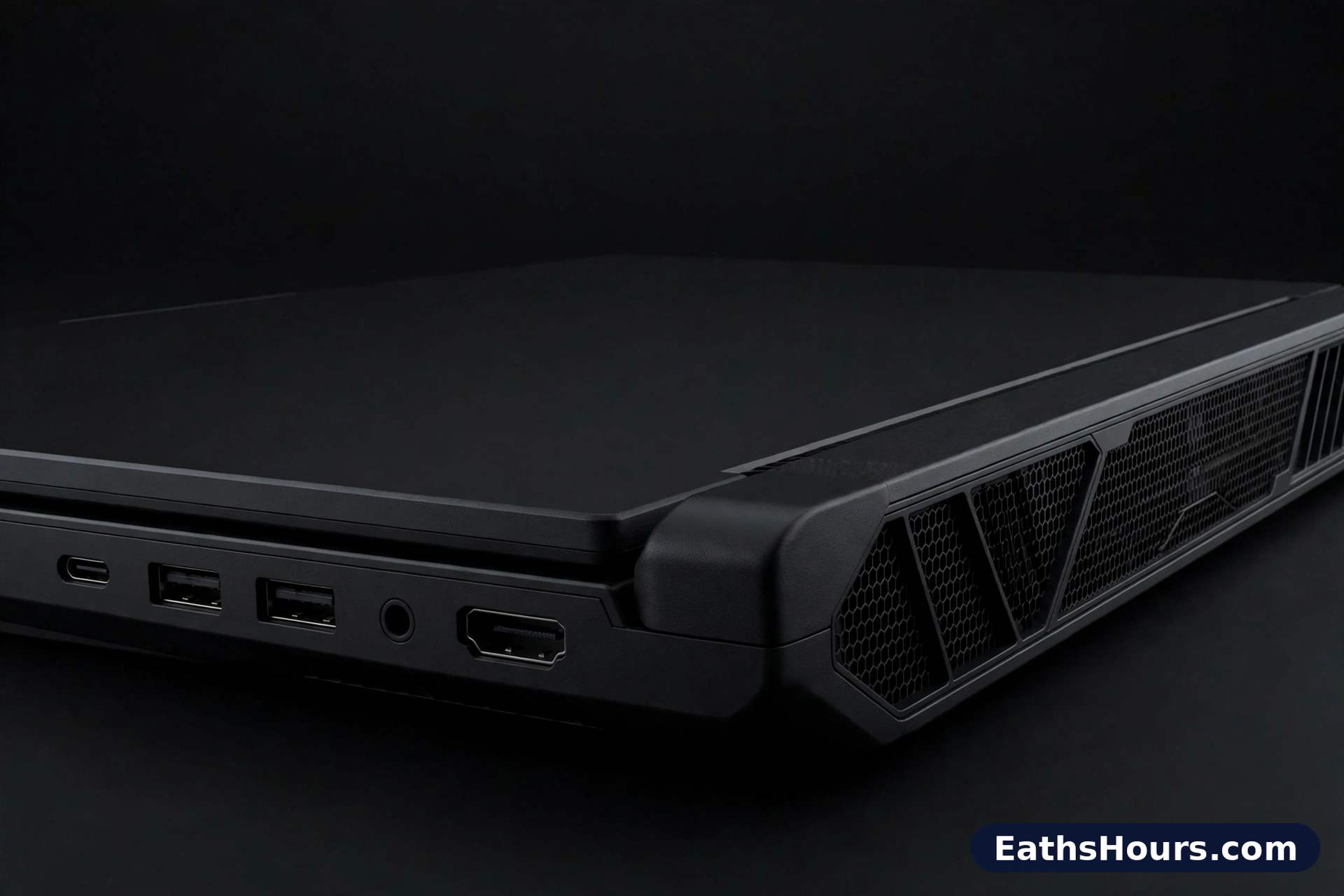
Sleek and Solid Design
The guide describes an aluminum chassis with a minimalistic gamer aesthetic. The dimensions underneath that description check out: the chassis measures 25 × 419 × 287 mm — slim for a 17.3-inch gaming machine of its years, and wide enough to explain the full-size keyboard the guide goes on to praise. The measured weight is 3.094 kg, not the “around 3.3 kg” of the profile table.
The material claim is where the record thins. The review record located for this article documents the case by its dimensions, finish and measured weight; it does not support the guide’s flat “aluminum chassis” wording, so that wording is recorded here as the guide’s claim rather than a finding. On a used unit, the honest check is physical anyway: lid, deck and base materials vary in feel by integrator finish, and wear shows first on the palm rest and hinge.
This section of the competitor’s page carries one more thing worth recording. On the competitor page, the words “Clevo PA71” in this section are wired as an outbound hyperlink to vicky.dev — an unrelated third-party site. Links like that are placed for search engines, not readers; the run has documented the same injected-anchor fingerprint on earlier topics in this series. It is recorded here and not reproduced.
Vivid Display for Gaming and Multimedia
The guide gives the PA71 one display: a 17.3-inch Full HD IPS panel at 144 Hz. The record gives it a shelf of panels, and 144 Hz is not on the shelf.
Notebookcheck’s review describes the choice facing a buyer of the PA71HS-G: 1080p, 1440p or 4K, all with G-Sync support. Its test unit carried the flagship — a 17.3-inch UHD (3840 × 2160) IPS panel at 60 Hz with a matte finish. The fast Full HD option documented in this chassis family was a 120 Hz panel, the same panel Notebookcheck had already met in the PC Specialist Defiance IV build of the same barebone. A 144 Hz Full HD panel is a specification of the generation that followed — Clevo’s slimmer PB71 line — and no PA71 record located for this article lists one.
So the corrected position is simple. A PA71 with a Full HD panel is the common case; a PA71 with a 120 Hz panel is a documented, desirable configuration; a PA71 advertised at 144 Hz is a listing to question, because the number belongs to a newer chassis. On any individual used unit, the panel’s hardware ID — readable in the operating system’s display settings — settles what is actually fitted, which is more than any guide’s table can do.
High-End Performance with Intel and NVIDIA
Start with the generation the review record covers in full. The PA71HS-G pairs Intel’s Core i7-7700HQ — a quad-core Kaby Lake processor running eight threads — with a choice of NVIDIA GeForce GTX 1060 (6 GB GDDR5) or GTX 1070. Notebookcheck’s verdict on that pairing was measured praise: the GTX 1060 suitable for 1440p gaming at most, the GTX 1070 able to handle 4K in a number of games at medium to high settings. That was strong performance for 2017–18, and it is the documented ceiling of this chassis.
The GTX 1080 in the competitor’s table is not part of it. No PA71 record located — not the review record, not the integrator pattern — offers that card in this chassis. The GTX 1080 does exist one shelf over: Clevo’s P775 desktop-CPU chassis, sold by Eurocom as the Sky X7E2, took a GTX 1080 or 1070 in an MXM slot alongside a socketed desktop i7-6700K, four memory slots and 64 GB of RAM, at about 4.17 kg. That is a different, larger machine, and its numbers — the 1080, the 64 GB — are exactly the numbers that keep leaking into PA71 guides.
The 2018 generation moved the processor, not the graphics ceiling. The PA71ES-G is built around the Core i7-8750H, a six-core Coffee Lake chip whose integrated graphics are Intel UHD Graphics 630 — which is why one copy’s claim of “UHD 630” as the laptop’s graphics is an error worth naming: the UHD 630 is the processor’s built-in graphics, present in every 8750H machine, and the discrete GTX card does the gaming work. Two processors, two generations, one graphics ceiling — kept apart in the next section.
Two Machines Under One Name: PA71HS-G and PA71ES-G Kept Apart
Almost every error in the PA71’s guide coverage dissolves once the suffix is read. The name on the chassis label is not “PA71” alone; it carries a generation code, and the code is the specification.
The PA71HS-G (2017) is the generation the review record documents end to end: Core i7-7700HQ, HM175 chipset, GTX 1060 or GTX 1070, DDR4-2400 in two slots to 32 GB, up to three storage devices, a 66 Wh battery, 25 × 419 × 287 mm, 3.094 kg measured. Schenker sold it as the XMG Pro 17; PC Specialist sold a build of it as the Defiance IV. The PA71ES-G (2018) refreshed the platform around the six-core Core i7-8750H and DDR4-2666 support. Its full factory sheet could not be retrieved for this article, so this page prints no ES-only battery, weight or panel figure as fact — the copies that do print them disagree with each other (60 Wh and 3 kg in one, different numbers elsewhere), which is what unverified copying looks like.
What followed is a third machine, not a variant: in 2019 Clevo replaced this line with the slimmer PB71 generation — different chassis, different dimensions, RTX graphics. PB71 figures (a 62 Wh battery, a 144 Hz panel, a lower weight) belong to that machine. A listing that mixes PB71 numbers into a PA71 description is describing no laptop that exists, and a buyer who checks the suffix on the label — HS, ES, or the PB71’s different name entirely — can catch it in seconds.
Exceptional Keyboard and Touchpad
The guide praises a full-size RGB backlit keyboard and a large, responsive touchpad. The full-size part is checkable from the chassis itself: at 419 mm wide, the PA71 has room for a full keyboard deck with a number pad, which is one of the practical reasons to buy a 17.3-inch machine at all.
The rest of the section is integrator territory. Keyboard backlighting specification and touchpad finish were build-and-badge details on a barebone sold through many shops, and the review record located for this article treats the input devices through its sibling review of the same chassis rather than a key-by-key test reproduced here. So the guide’s wording — “exceptional”, “precise tracking” — stands as its own assessment, not a verified finding. For a used buyer the working check is simpler than any adjective: a worn space bar and shiny keycaps price a machine down, and every key can be tested in a minute with the machine in front of you.
Sound Quality and Cooling System
The guide credits the PA71 with clear speakers and an efficient dual-fan cooling system — and then, in its own pros-and-cons table further down the same page, lists “basic speaker quality” and “loud fans during high load” as two of its four cons. Both versions cannot be the headline, and the cons are the more believable half: they are concessions, and concessions are usually where a guide is honest.
What the record adds is shape rather than decibels. A GTX 1070-class graphics card in a chassis 25 mm thick has serious heat to move, and every gaming laptop of this design era moved it audibly; no laboratory sound measurement of this chassis was located for this article, and none is invented here. The practical reading for a buyer is the guide’s own pair of admissions, held together: expect fan noise under gaming load, and do not buy this machine for its speakers. Headphones were always the intended audio path for a 2017 gaming laptop, and this one is no exception.
Battery Life and Portability
Here the documented figure is a capacity, not a duration: the PA71HS-G carries a 66 Wh, 4-cell lithium-ion battery. The guide’s “3–4 hours (average usage)” cites no capacity and no test, and no test record located for this article supports a single flat figure for the family — runtime on a gaming chassis swings with the panel fitted (a 4K screen drinks more than a Full HD one), the graphics card, and the workload. On the used market there is a further variable no guide can print for you: a 2017–18 battery has years of wear on it, and its health percentage matters more than its original rating.
Portability is arithmetic. The machine measures 3.094 kg; its power supply, measured in the same review, adds 730 g — about 3.8 kg in the bag before a mouse or headset. That is portable in the sense that it moves between desks happily, not in the sense that you forget it is there. The competitor’s own table called this weight “around 3.3 kg (7.2 lbs)”; the figure is wrong twice over, being both more than the measured Clevo and exactly the published weight of the Lenovo machine examined next.
The PA71 and the P71: A Name Collision Worth Knowing
Lenovo’s ThinkPad P71 is a real, well-documented 17.3-inch mobile workstation: Xeon E3 v6 processors, NVIDIA Quadro graphics, four SO-DIMM slots taking up to 64 GB of DDR4, a 96 Wh battery — and a published weight of exactly 3.30 kg (7.3 lbs), repeated across its datasheets and specification databases.
Set that beside the Clevo PA71 — Core i7, GeForce GTX, two slots, 32 GB ceiling, 66 Wh, 3.094 kg measured — and the corruption pattern in the guide coverage explains itself. The competitor’s “around 3.3 kg” is the P71’s weight. The copies’ “up to 64 GB” is the P71’s memory ceiling. A writer (or a generator) assembling a PA71 page from search results that mix both machines will import the wrong datasheet one line at a time, and the result reads plausibly because every individual number is real — for the other laptop.
The defence is mechanical: the manufacturer’s name travels with the model. “Clevo PA71HS-G” and “Lenovo ThinkPad P71” never collide; it is the bare “PA71” search term that does. Any specification that cannot be traced to a page naming Clevo and the full chassis code should be treated as belonging to neither machine until it is.
Expandability and Customization
Customization is the PA71’s founding idea — it is a barebone — but the record shows where the customization actually happened: at order time, on the integrator’s configurator, where the buyer chose processor generation, graphics card, panel, memory and drives before the machine was assembled. What remains open after purchase is documented and specific.
Memory expands through two SO-DIMM slots to a 32 GB ceiling — the review unit’s 2 × 16 GB DDR4-2400 filled both slots, so a base 8 GB or 16 GB unit has a real upgrade path and a maxed unit has none left. Storage expands furthest: two M.2 slots plus a 2.5-inch bay allow up to three devices in total, so the common pattern of a fast SSD beside a large hard drive (the review unit’s 500 GB + 1 TB) is one choice among several, not the machine’s fixed anatomy. The competitor’s profile presents that one pairing as “the” storage specification; the chassis is more flexible than its table.
That is the honest scope of it. The guides that promise near-desktop upgradability for this name are usually, once again, describing the bigger desktop-CPU chassis. On the PA71, the upgrades that exist — memory and drives — are genuinely easy, and the ones that do not are not hidden, just documented elsewhere under a different model name.
Ideal Use Cases for Clevo PA71
The guide lists gaming, content creation, programming and development, and virtual reality. Taken one at a time, against the record:
Gaming is the machine’s home ground, with a date attached. A GTX 1070 configuration was a strong 1080p gaming machine in 2017–19. The guide’s claim that it runs Call of Duty, Cyberpunk 2077 and Elden Ring “with ease” needs its correction: the last two titles launched in 2020 and 2022, years after this chassis, and a GTX 1070-class card plays them at reduced settings rather than with ease. As a budget used buy for the back catalogue and esports titles of its own era, the case is real; as a modern flagship machine, it is not.
Content creation and programming and development survive the checks in their general form: a quad- or six-core i7, up to 32 GB of RAM, three storage devices and a large colour screen are a sensible editing and coding specification, and the 4K panel option was sold at exactly that work. Virtual reality is an era claim: the GTX 1070 configuration clears the published VR minimums of its period (which were set at GTX 1060-class hardware), so a PA71 bought for VR in 2018 was a rational purchase; a buyer in the used market today should check the specific unit’s graphics card and ports against their headset’s requirements rather than trust the guide’s blanket sentence.
Pros and Cons of Clevo PA71
The competitor’s pros-and-cons table is kept as published. Of its four cons, two are corroborated by the shape of the record — the machine is heavy because it measurably is, and its fans are conceded by the guide itself — while its first pro needs the display correction from earlier in this article: the high refresh rate documented for this chassis is 120 Hz, not the profile table’s 144 Hz.
| Pros | Cons |
|---|---|
| High refresh rate display | Loud fans during high load |
| Powerful CPU and GPU | Below-average battery life |
| Customizable hardware | Heavier than most gaming laptops |
| Solid build quality | Basic speaker quality |
How to Check Any Laptop Model Code Before You Buy

The PA71’s muddled paper trail is a general problem with a general solution — the same habit this run practised on the classroom x15 topic: read the primary record before the guides. For a barebone-era laptop, five checks do most of the work:
- Read the full chassis code, suffix included. “PA71” names a family; “PA71HS-G” and “PA71ES-G” name machines, with different processors and different ceilings. The suffix is on the unit’s label and in its manual; a listing that will not state it has not identified the machine.
- Weigh the listing against a measured record. Copied tables drift — this one’s weight came from a different manufacturer’s datasheet. An independent review that put the machine on a scale (3.094 kg here) outranks every seller’s rounded number.
- Count the slots. Two memory slots and a 32 GB ceiling identify this chassis; four slots and 64 GB identify the desktop-CPU machines its numbers keep getting mixed with. Slot counts are hard to fake and easy to check in any teardown or manual.
- Identify the panel by its hardware ID, not the listing’s refresh rate. A panel ID such as AUO B173ZAN01.0 resolves to an exact specification; “144 Hz” in a listing for this family resolves to a different, newer chassis.
- Date the sources. Integrator pages and reviews from the model’s own years (2017–19 here) describe the machine as sold; guide pages written years later, which copy each other and contradict each other on price, size and memory in the same breath, describe the search term. Buy from the first kind of source, verify with the second never.
Is the Clevo PA71 Still Worth Buying?
As a new machine, the question is closed: the PA71 line was replaced by the PB71 generation in 2019, and the integrators who sold it have long since moved on. The live question is the used one, and there the answer depends on which machine is actually in the listing — the whole argument of this article.
The documented launch economics frame it. This chassis started at €1,449 in base form and cost €2,679 in the reviewed 4K configuration in 2018; those are the numbers a used price should be a fraction of. The copies’ used-price claims — $350–475 in one guide, $1,500–2,000 in another — are printed there as claims, not as a market survey, and a buyer should treat them the same way. What moves a PA71’s value is checkable: GTX 1070 over GTX 1060, the 120 Hz or 4K panel over the base screen, 32 GB over 8 GB, and a battery that still holds a useful share of its 66 Wh. A unit that checks out on those four points is a lot of 1080p gaming hardware for used money. A unit described only by the merged guide table — 1080, 144 Hz, 64 GB — is a listing describing a laptop that does not exist, priced by someone who has not checked what they are selling.
Conclusion
The Clevo PA71 is a real machine with an unreal biography. The chassis checks out at every point where a primary record exists: a 17.3-inch Clevo barebone in two generations, i7-7700HQ or i7-8750H depending on the suffix, GTX 1060 or GTX 1070 graphics, two memory slots, three drive bays, a 66 Wh battery and a measured 3.094 kg. The guides’ version — one laptop with both processors, a GTX 1080, a 144 Hz screen, 64 GB of memory and a 3.3 kg weight — is assembled from that machine, its successor, its bigger desktop-CPU sibling and a Lenovo workstation, and was never built by anyone.
That is why the model repays checking rather than dismissing. A PA71 is best understood as what it literally is: a barebone computer — a platform that left Clevo unfinished and took its final specification from whichever integrator configured it. The spec sheet that counts is therefore not any guide’s merged table; it is the individual unit’s own label, panel ID and configurator record. Read those, and the PA71 is exactly as good as its documented hardware — no better, and no worse.
FAQs About Clevo PA71
What GPU comes with the Clevo PA71?
A GeForce GTX 1060 (6 GB GDDR5) or a GeForce GTX 1070, depending on the configuration — those are the options in the documented record. No PA71 record located offers a GTX 1080; that card belongs to Clevo’s larger desktop-CPU chassis.
Is the Clevo PA71 good for gaming?
In its era, yes: the GTX 1070 configuration was a strong 1080p gaming machine. Today it suits the back catalogue and lighter modern titles at reduced settings; it has no ray tracing or DLSS, and demanding recent games at high settings are beyond it.
Can I upgrade the RAM on the Clevo PA71?
Yes. The chassis has two SO-DIMM slots and a 32 GB ceiling, so a unit that shipped with 8 GB or 16 GB can be upgraded; a unit already at 32 GB cannot go further. Claims of 64 GB belong to a different, four-slot chassis.
Does the Clevo PA71 support VR gaming?
The GTX 1070 configuration clears the VR minimum specifications of the machine’s period, and VR was a headline use when it was sold. For a modern headset, check the individual unit’s graphics card and ports against the headset maker’s requirements before buying.
What is the battery life of the Clevo PA71?
The documented battery is a 66 Wh, 4-cell pack. No test record located supports the guide’s flat “3–4 hours” figure; runtime depends on the panel, workload and — on used units — the individual battery’s remaining health.
Where can I buy a Clevo PA71?
Not new: the line was replaced in 2019. The guide’s named sellers — Sager, XoticPC, Eurocom — are genuine Clevo integrators, which is the right trade to search, but today the machine trades second-hand under the integrators’ own model names (such as Schenker’s XMG Pro 17 or PC Specialist’s Defiance IV) and under the chassis code PA71HS-G or PA71ES-G. Search by the full chassis code, and check the unit against the record before paying.